
Never Miss a Lead Again

Why I Do This
Most small businesses don’t have a lead problem.
They have a lead system problem.
Someone searches LinkedIn for an hour. Names go into a spreadsheet. A few emails get written by hand. Then the week gets busy, and nobody follows up.
Two weeks later, the spreadsheet is out of date and the leads have gone cold.
Meanwhile, competitors are using AI to research prospects, write personal first lines and follow up on time, every time.
The good news: the same tools are now available to any business. You don’t need a sales team, and you don’t need to write code.
In this article, I’ll walk through the lead generation setups I see working right now, what each one is good for, where each one falls short, and how I decide which one fits a business.
“Never miss a lead” means two things: find the right people, and follow up with every one of them.
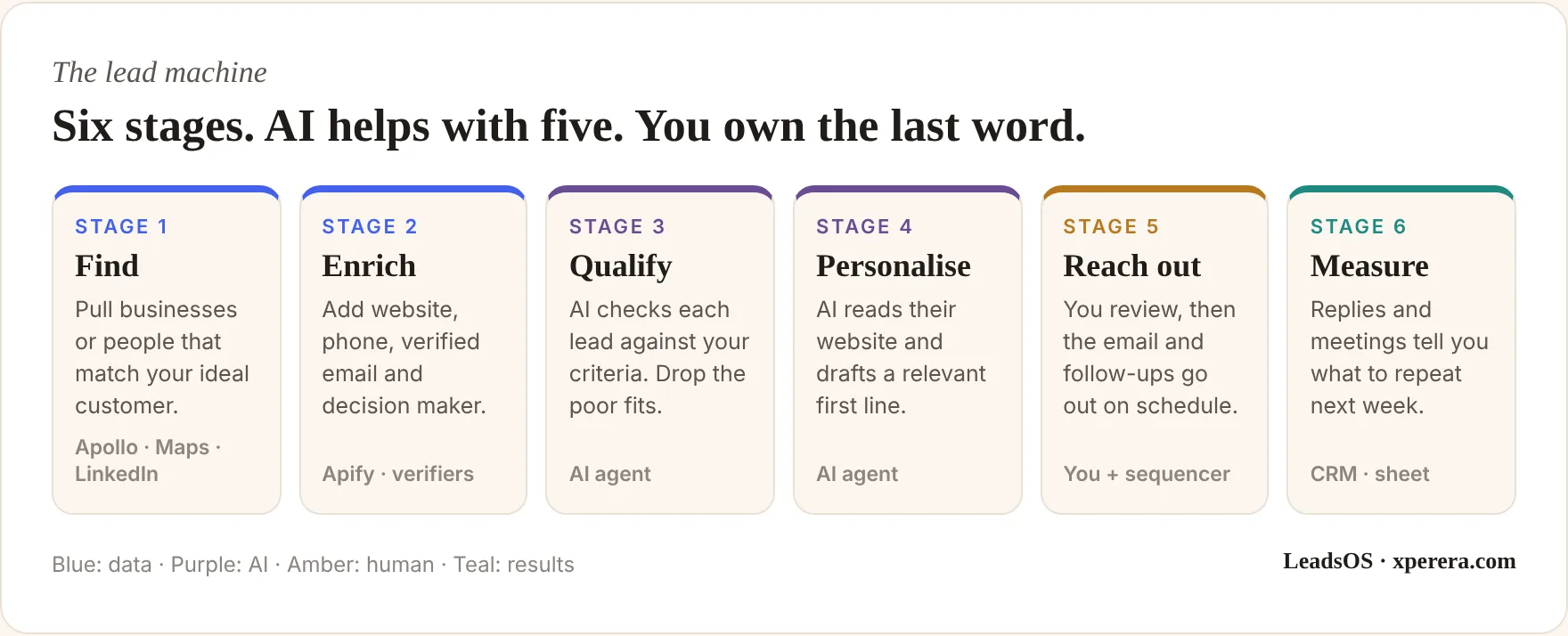
Start With Who, Not With Tools
Before any software, you need clarity on who you’re trying to reach.
AI can build a list of 50,000 businesses in an afternoon. That doesn’t help if they’re the wrong 50,000.
A simple test I use: a good lead passes three checks.
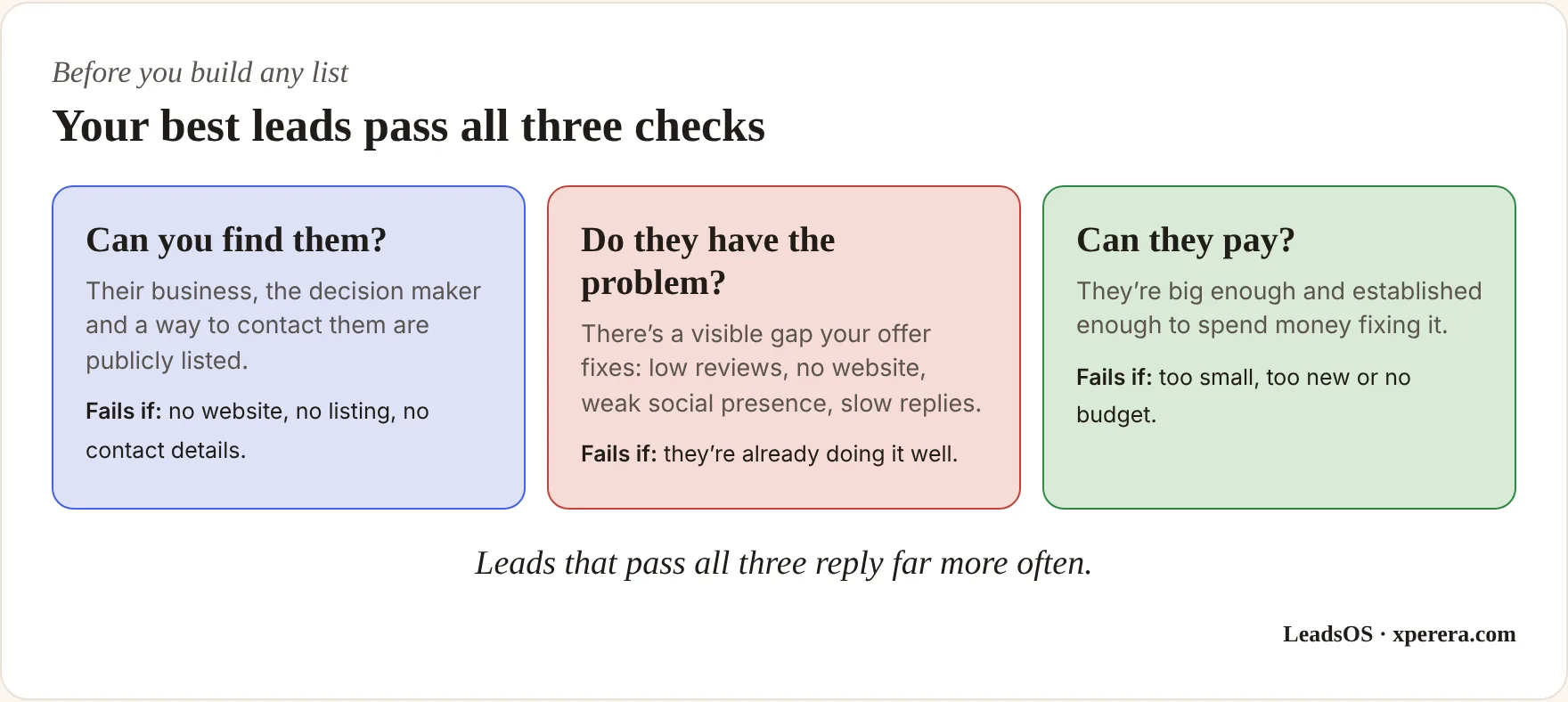
If you can’t describe your offer and your ideal customer in two sentences, fix that first.
All the AI in the world won’t save a vague offer sent to the wrong people.
Where Your Leads Actually Live
Almost every lead generation system pulls from one of three sources. Each one suits a different kind of business.
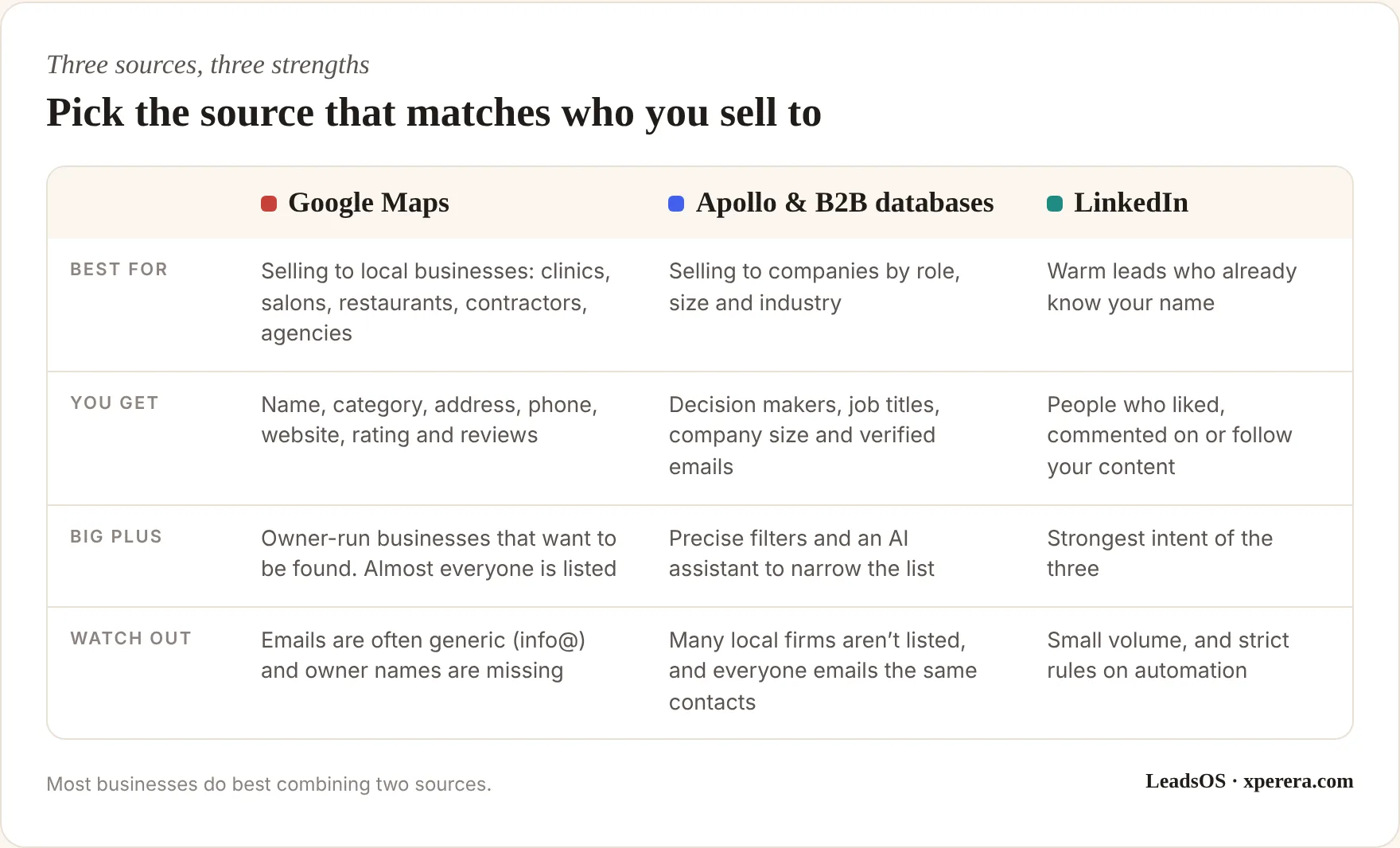
Google Maps is the richest public source for local businesses. If you sell to clinics, salons, contractors or restaurants, they’re almost all there, and most are run by the owner who reads the email.
The listing also tells you how to sell to them. A low rating suggests reputation help. No website suggests a website. Slow replies to reviews suggest a customer service gap.
The catch: Maps gives you a phone number and a website, but usually not the owner’s name or a personal email. That needs an extra step, called enrichment.
Apollo and similar databases work the other way round. They’re built around people and job titles, so you can search for “founders of 11 to 200 person software companies” and get decision makers with verified emails. Much of that data originates from public professional profiles, which is why smaller local businesses are often missing.
LinkedIn is the warmest source. Someone who reacted to your post last week already knows who you are. The list is smaller, but replies come much more easily.
Four Ways to Build the System
There’s no single right setup. Here are the four I see working best, from the easiest to the most technical.
1. Apollo with its built-in AI
Apollo is the simplest all-in-one option: find contacts, get verified emails and send the sequences from one place.
The newer AI features make it much faster. You give it your website, and it works out your offer, your customers’ pain points and your call to action. That context shapes the searches and the emails it writes later.
Then you search in plain English. For example: “Find B2B service businesses doing over a million in revenue that don’t have a strong social media presence.”
The assistant applies the filters, narrows thousands of companies down to a shortlist, and can add an AI research column explaining why each one fits.
From there, it drafts the campaign: a first email plus follow-ups, with the company name, industry and first name filled in.
Best for: B2B businesses that want one tool, little setup and no technical work.
2. An n8n workflow that runs on its own
If you want a repeatable pipeline you control, n8n is my favourite option. It’s a visual automation tool: you connect boxes, and each box does one job.
A typical lead workflow looks like this:
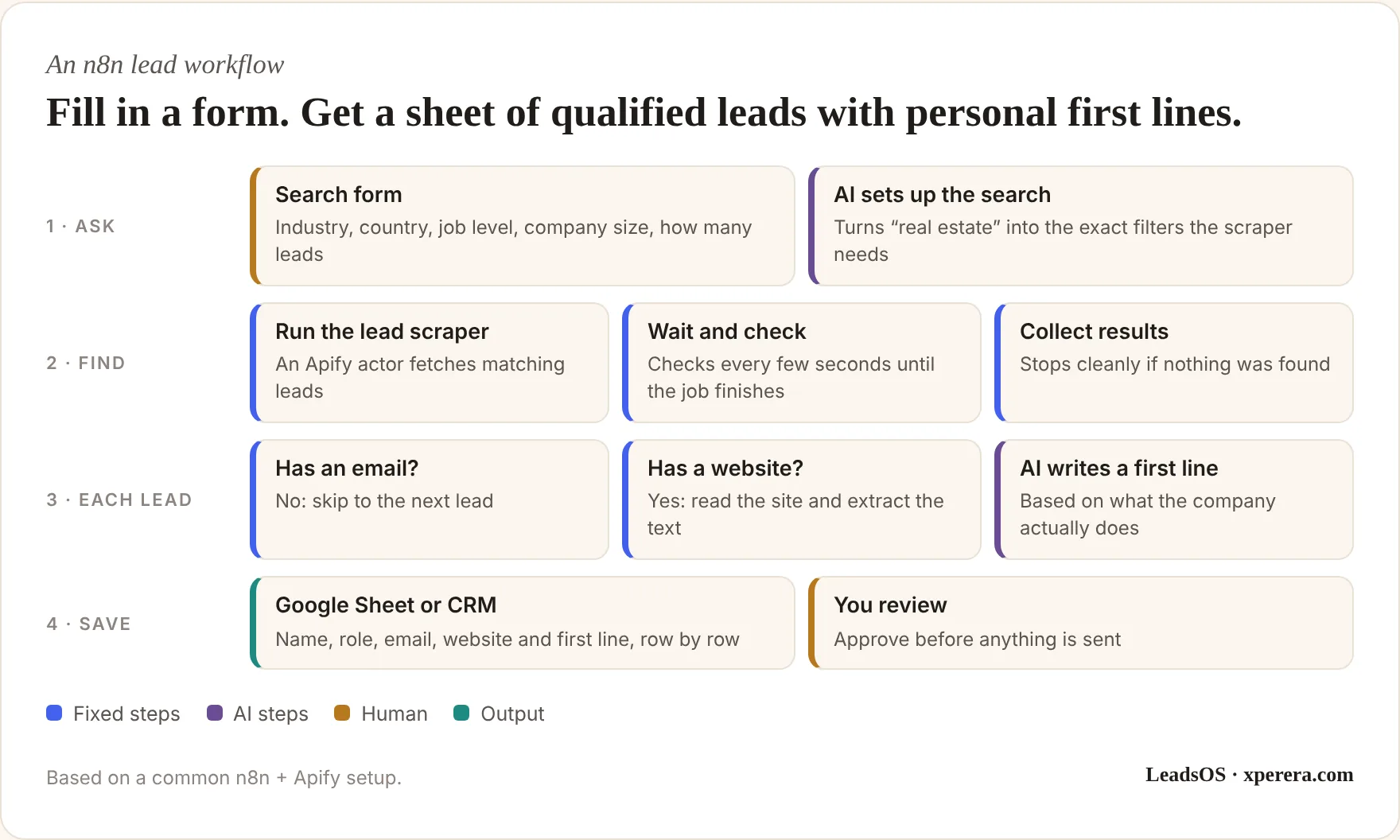
Two details make this setup especially practical.
First, the scraping is done by Apify, a marketplace of ready-made scrapers called actors. Someone else maintains each one, so you don’t deal with servers, browsers or blocks. You pay per result, which keeps small campaigns cheap.
Second, the AI steps can run through a service such as OpenRouter, which gives one connection to ChatGPT, Claude, Gemini and others. If a better or cheaper model appears, you switch one setting.
The personal first line is where this beats a generic database export. The workflow visits each company’s website and writes a sentence that shows you actually looked at their business. Feed it a few of your best-performing openers as examples, and the quality goes up noticeably.
n8n can run on n8n’s own cloud or on a small virtual private server (VPS). I usually recommend a VPS once a business runs several workflows, because it keeps costs flat and the data under your control.
Best for: businesses that run the same kind of search every week and want it hands-off.
3. Claude Code: describe the leads you want in plain English
This is the newest approach, and for one-off or varied research it’s remarkably flexible.
Claude Code is an AI assistant that can operate other tools for you. Connect it to Apify through an MCP connector (a bridge that lets the AI use Apify directly), and you can simply type what you need:
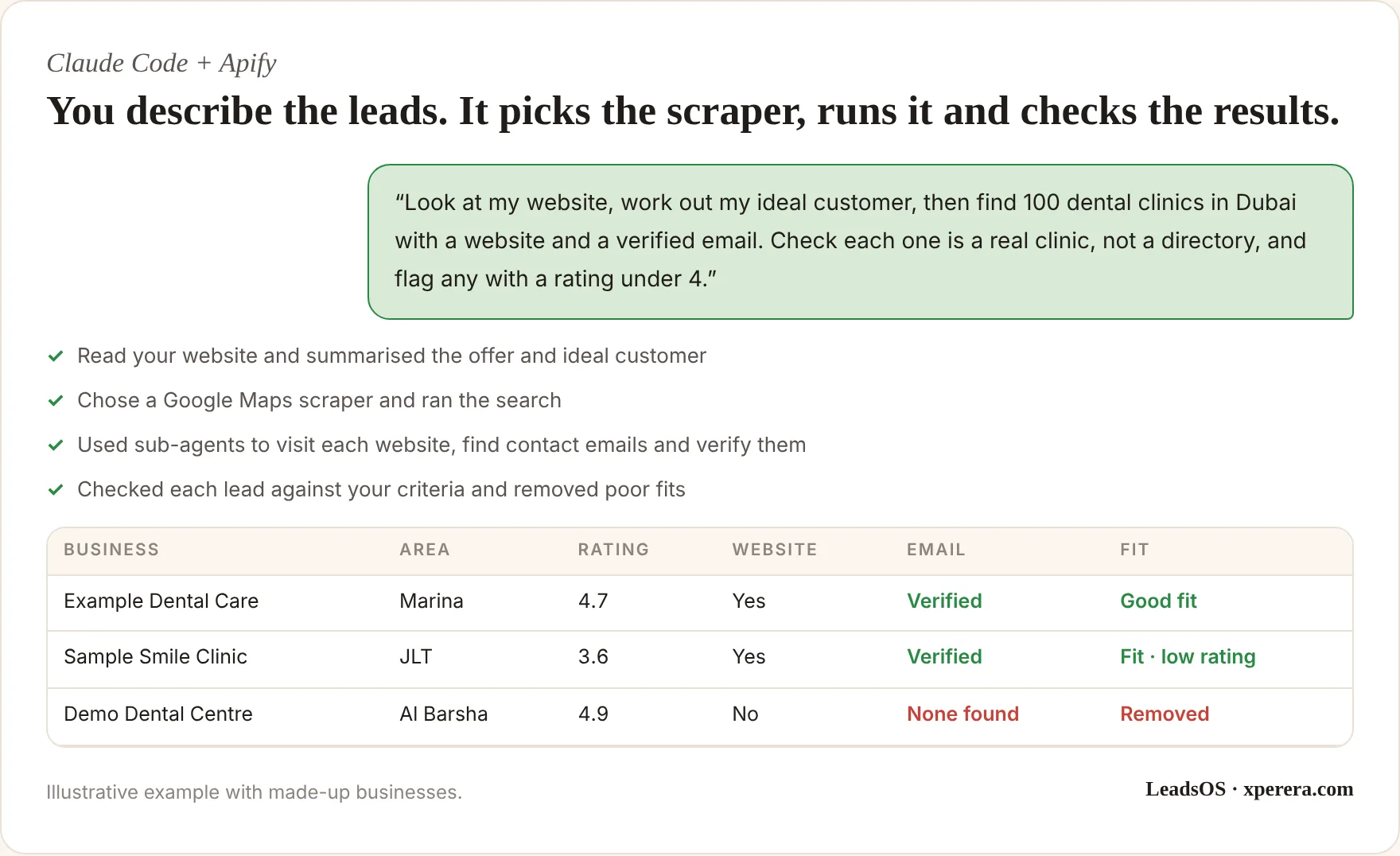
Behind the scenes, Claude picks a suitable scraper, runs it, and then sends sub-agents to do the slow work: visiting each website, finding contact emails, checking whether a business is B2B or B2C, or confirming it matches your ideal customer.
You can also save the whole routine as a Skill, a reusable set of instructions. Next time, “find dentists in Sharjah with verified emails” is all you need to type.
The same setup works for LinkedIn. Ask it to collect the people who engaged with your posts last week, then shortlist the ten who best match your ideal customer. That’s a warm list you can contact with a personal note.
If something looks wrong, you just tell it what to fix. No filters to configure, no exports to clean.
Best for: owners and consultants who want flexible, on-demand research without building a fixed pipeline.
4. Your own lead engine on a VPS
Some businesses, usually agencies or anyone working at high volume, outgrow pay-per-result tools.
The next step is a lead engine you host yourself on a VPS: a small rented server that runs around the clock. I recommend a VPS over a computer in the office. It doesn’t depend on your power, internet or anyone remembering to leave it on, and it’s easier to secure.
A typical setup has three parts:
- The collector: an approved data source, such as Google’s official Places API for business listings, or a managed scraper.
- A database: Postgres or Supabase, both free and open source, to store every result.
- A seed list: every city and keyword combination you want covered, so the engine works through it steadily and never repeats a search.
Over time, you build your own database of businesses that nobody else is emailing. That’s a real advantage.
It also brings real responsibilities: maintenance, security and keeping within each platform’s rules. For most small businesses, options one to three are the better place to start.
Best for: agencies and high-volume teams with ongoing, large-scale needs.
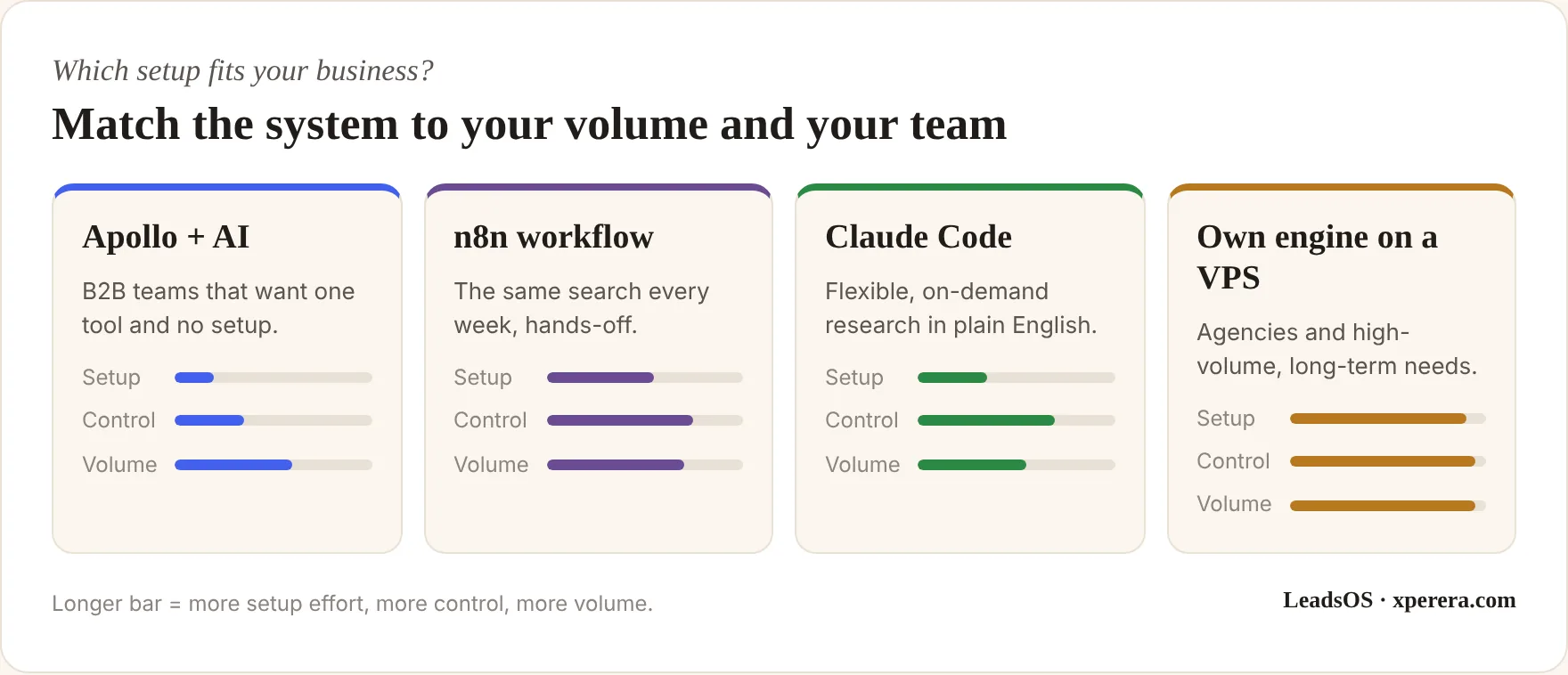
In practice, many businesses combine them. Apollo for B2B decision makers, Claude Code for a quick local list, and n8n to push everything into the CRM.
The right mix depends on who you sell to, how many leads you need each month and who on your team will look after it. That’s exactly what I work out with a business before building anything.
Play by the Rules
This part matters, and many tutorials skip it.
Most platforms, including Google Maps and LinkedIn, don’t allow automated scraping in their terms of use. Using official APIs, licensed databases like Apollo and managed services keeps you on much safer ground. Small, targeted lists for your own outreach also carry far less risk than mass harvesting, but they don’t make the terms go away, so always check before you build.
Data protection law applies too. In the UAE, that’s the Personal Data Protection Law. If you contact people in Europe or the UK, GDPR applies.
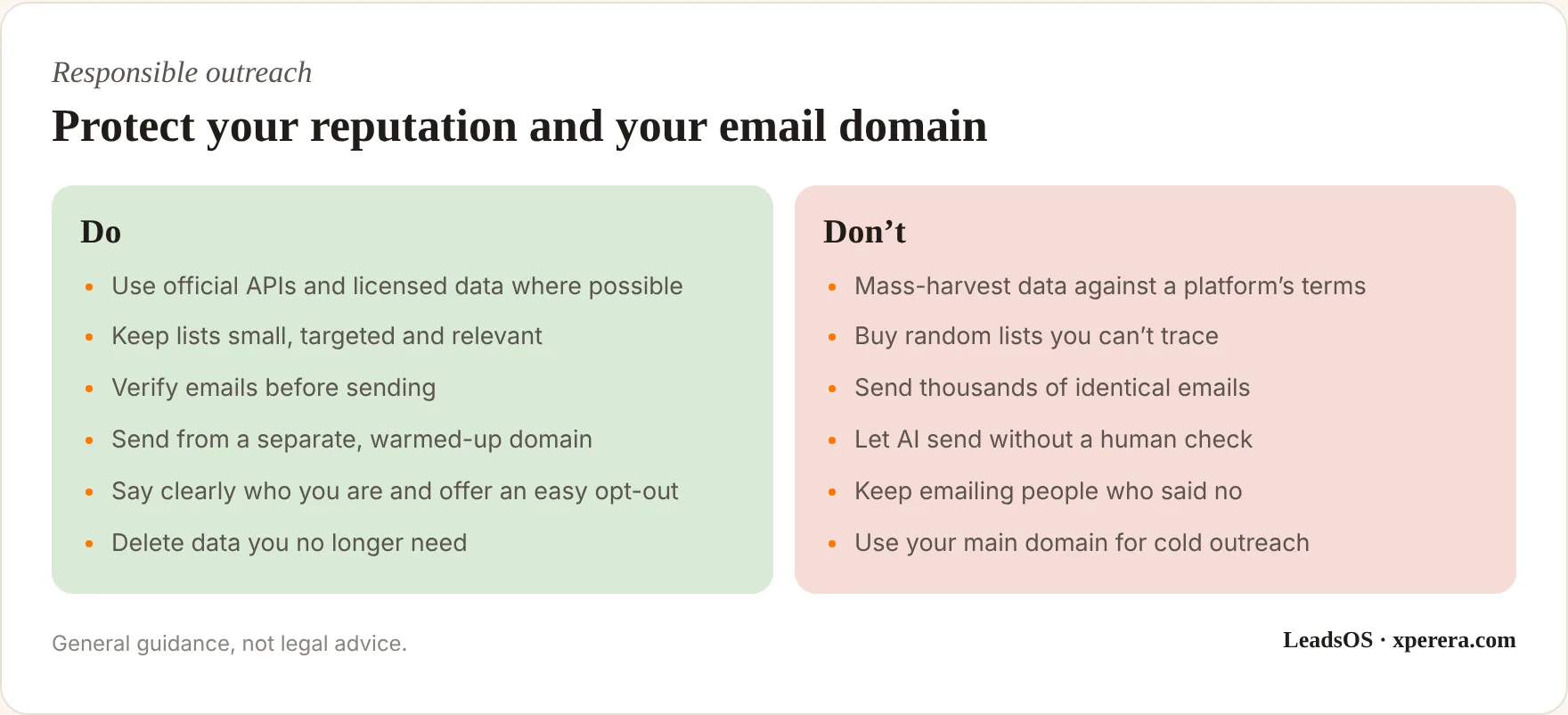
The goal was never to email as many people as possible.
It’s to have more good conversations with the right people.
Writing a First Email People Answer
The tools find the people. The message decides whether they reply.
A good cold email is short, specific and about them, not you. I use a simple structure:
- A personal first line that proves you looked at their business
- One problem you noticed or that businesses like theirs commonly face
- One sentence on how you help, ideally with a real result
- One easy question, not a request for a 45-minute meeting
Something like this:
Hi Sara, I saw Example Dental just opened a second clinic in JLT, congratulations. Many growing clinics find new-patient enquiries slip through the cracks between two front desks. We help clinics reply to every enquiry within minutes, without adding staff. Would it be useful if I sent over how one clinic set this up?
Under 80 words. No attachments, no links in the first email, no “I hope this finds you well”.
Give your AI tool a few examples like this, plus a list of words and phrases to avoid. Then edit every draft before it goes out.
A Worked Example
Here’s how this might come together for a small property management company in Dubai that wants more landlord clients.
Week one: we agree the ideal client: landlords and small developers with several units, poor reviews on their current management, or listings that look neglected. Google Maps and property portals help find buildings and existing managers with weak ratings. Apollo helps find owners of small real estate investment firms.
Week two: an n8n workflow pulls both lists into one sheet, removes duplicates, checks every email and adds a first line based on each website. Claude Code handles one-off research, like “find holiday-home operators in Business Bay with fewer than 50 reviews”.
Weeks three and four: the team sends 30 to 40 reviewed emails a week with the four-step follow-up. Every reply goes straight into the CRM with a reminder. At the end of the month, we compare reply rates by segment and double down on the one that worked.
No new staff. No list of 10,000 strangers. Just a steady flow of relevant conversations.
The Real Secret: Follow-Up
Here’s where most leads are actually lost.
Not at the search stage. At the follow-up.
A first email often gets no reply simply because the timing was wrong. A short, well-timed follow-up sequence fixes most of that:
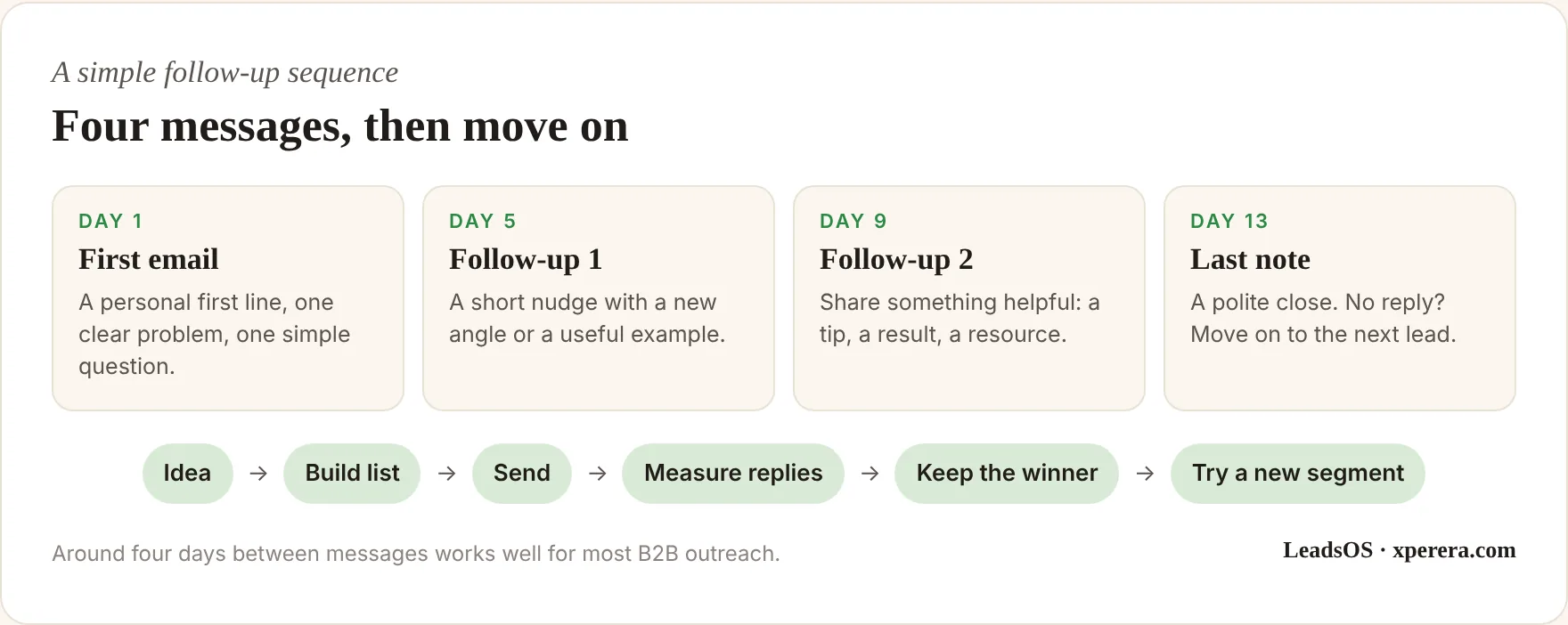
Then treat every campaign as a test.
Track open rates, reply rates and meetings booked. Test two subject lines. Keep the winner and try a new variation against it.
If real estate agencies in Dubai reply well, try the same message in Abu Dhabi. If they don’t, try a different industry next week. Small improvements every week add up to a reliable lead machine.
And don’t forget the leads that come to you. A website enquiry that sits in an inbox for two days is a lead you’ve already lost. A simple workflow can log every enquiry in your CRM, alert the right person immediately and create a follow-up task. I cover that in Stop Copying Data Between Tools.
Keep a Human in Charge
AI can now do most of the heavy lifting in lead generation: finding, enriching, qualifying and drafting.
But it works from your inputs. Who to target, which problem to lead with and what a good fit looks like all come from your knowledge of the market.
Weak inputs give you a fast way to send poor emails to the wrong people. Strong inputs give you a system that books meetings while you work on other things.
It also can’t build trust for you. The meeting, the proposal and the relationship are still yours. What AI gives back is time: hours that used to go on searching, copying and chasing, now spent on calls with people who actually want to talk.
That’s the real return on a good lead system. Not more emails sent, but more of your week spent with real prospects.
Think of AI as a bicycle for your sales effort. It gets you there much faster, but you still choose the direction.
What I Bring
I don’t hand over a tool and disappear. Together we build a lead system that fits how your business already sells:
- Your lead map: who your best customers are, where they’re listed and which source to use for each segment
- A working pipeline: Apollo, n8n or Claude Code set up for your business, hosted on a VPS where it makes sense, with your data in your own sheet or CRM
- Your outreach kit: email templates in your voice, a follow-up sequence, sending-domain setup and a simple weekly report so you know what’s working
Then I train your team to run it, so it keeps working after I step back.
Frequently Asked Questions
Which lead source is best for a local business?
If you sell to local businesses, Google Maps data is usually the best starting point, because almost every local firm is listed and most are owner-run. If you sell to companies by role or size, a B2B database like Apollo is usually better.
Do I need technical skills?
Not for Apollo or Claude Code. An n8n workflow needs some setup but no coding once it’s running. A self-hosted engine on a VPS is a technical project best set up for you.
Is scraping leads legal?
It depends on the source, the platform’s terms and the data protection laws where you and your leads are. Official APIs and licensed databases are the safest route. Check the terms and get advice before building anything at scale.
How many leads should I contact each week?
Start small. A few dozen well-researched, personalised emails usually beat thousands of generic ones, and they protect your email domain while you learn what works.
Will AI write all my emails?
It will write good first drafts. You should still edit and approve them, so they sound like you and say something the reader actually cares about.
Want a lead system that fits your business?
Book a 20-minute call and we’ll work out where your best leads are and which setup suits you.