
Get Your Whole Team Using AI Properly

Why I Do This
Buying an AI subscription for your company is easy.
Getting your people to use it properly is a completely different challenge.
A company can pay for ChatGPT, Claude, Gemini or Microsoft Copilot and still see very little business value.
Why? Because having AI is not the same as using AI well.
An employee may have ChatGPT open in a browser tab and still write every email by hand.
A marketer may know AI can help with content and still spend two hours starting every post from a blank page.
A manager may have Copilot inside Microsoft 365 and never use it for meetings, documents or reports.
And someone who was never told what should stay out of AI may paste in information the company never meant to share.
That’s why AI adoption takes more than handing people a login.
People need to learn how AI fits into the work they already do.
That’s the focus of my AI training and implementation approach.
AI Training Shouldn’t Be a Two-Hour Presentation
Traditional software training usually goes like this: here’s the software, here are the menus, here are the features, now go and use it.
AI needs a different approach.
The tools change every few months. Menus move. Features get renamed. Memorising where a button sits is the least valuable thing anyone can learn.
What lasts is knowing how to work with AI: what to ask it, what to give it, how to check what comes back and when not to use it at all.
Your employees don’t need to become AI engineers. They don’t need to understand machine learning.
They need to become confident, careful AI users in their own jobs. That only comes from hands-on practice with their own work.
The Training Gap Is Real
AI has spread through workplaces remarkably quickly.
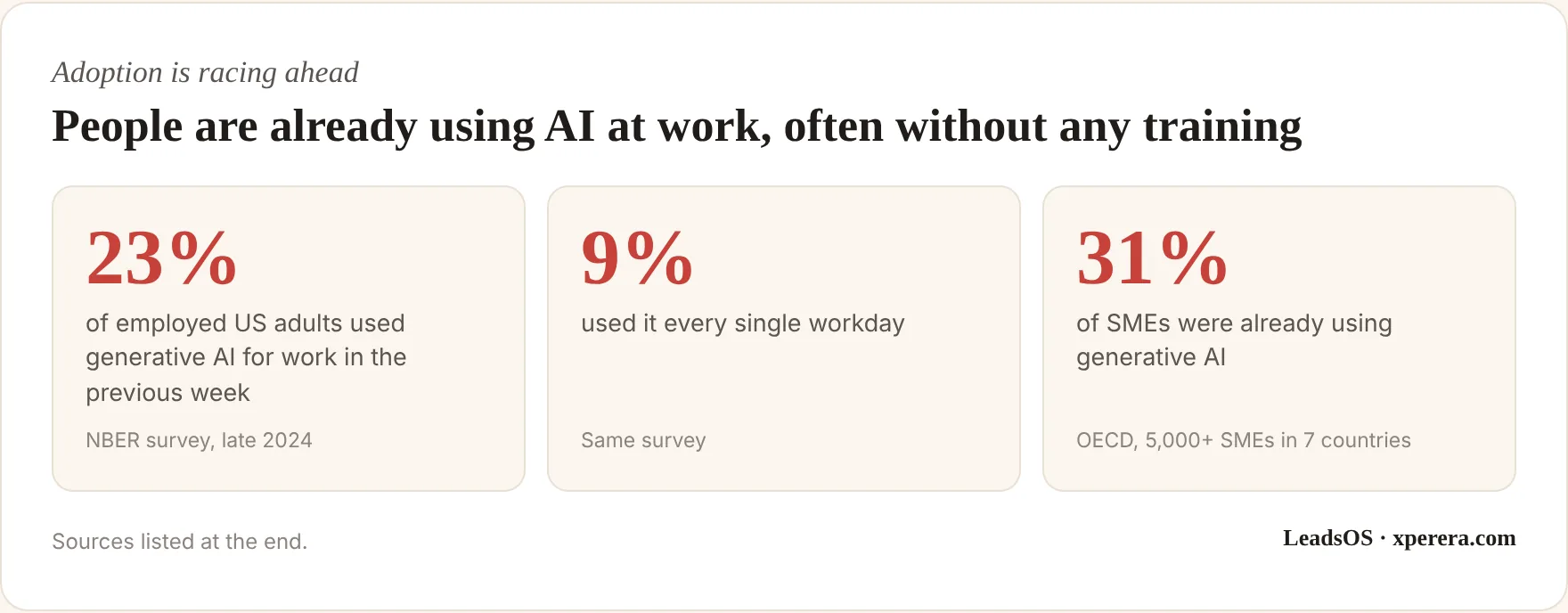
The researchers behind that US survey noted that AI was spreading through workplaces at least as fast as the personal computer did in its early years.
Training hasn’t kept pace.
In most small businesses I meet, people are learning AI informally: from YouTube videos, a colleague’s tip, social media posts and trial and error.
That’s fine for experimenting. It isn’t a company-wide strategy.
Ten people learning ten different ways means ten different levels of quality, ten different ideas about what’s safe to share, and no way to build on what works.
Using AI vs Working With AI
There’s a small but important difference between the two, and it’s the whole point of good training.
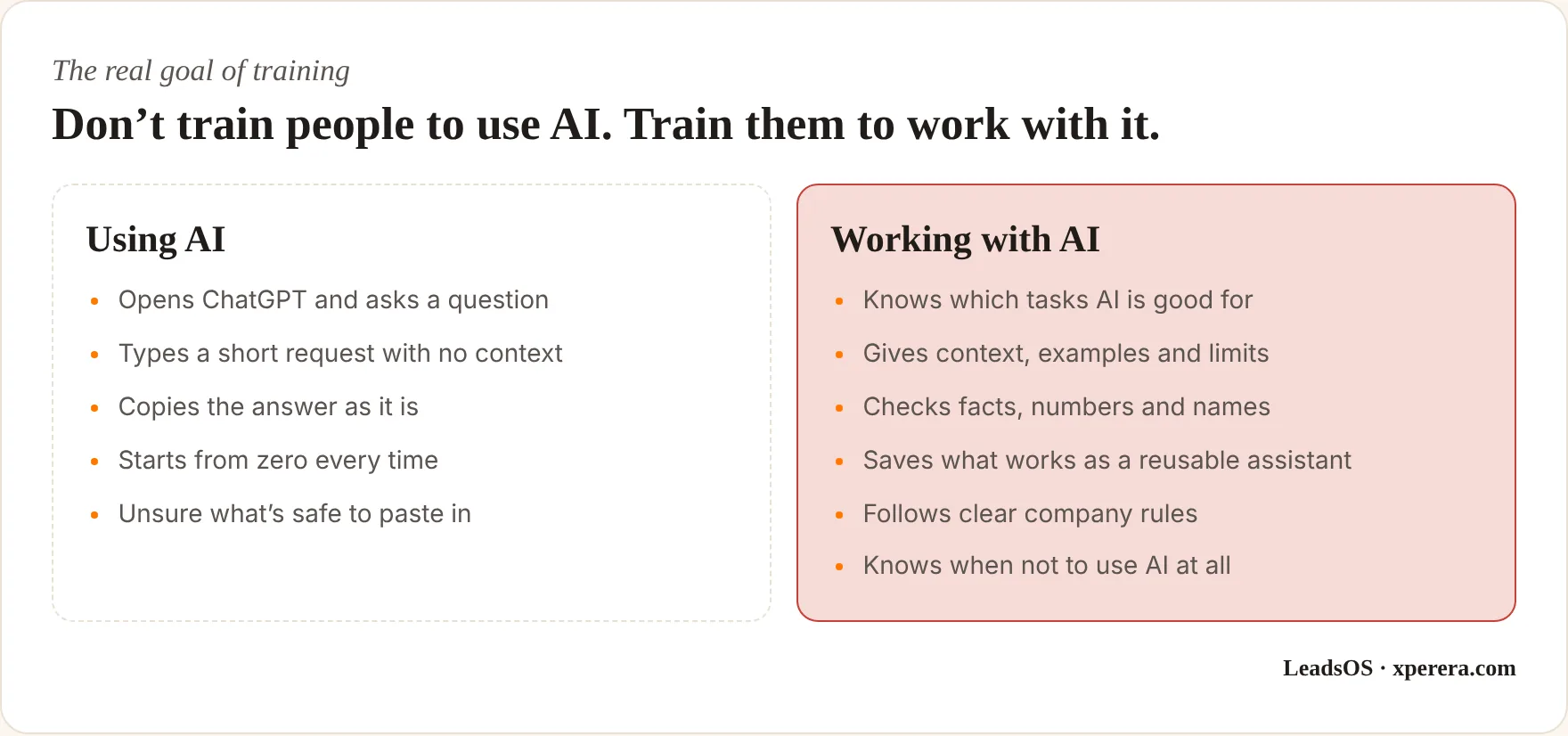
That’s the skill businesses actually need. Here’s how I build it.
Start With the Job, Not the Prompt
One of the biggest mistakes in AI training is opening with “Here are 20 powerful prompts.”
Prompts are useful. But a list of clever prompts doesn’t change how anyone works on Monday morning.
People need answers to five practical questions:
- What should I use AI for in my job?
- When should I not use it?
- How do I give it the right context?
- How do I check what it gives back?
- How do I turn something that worked once into something I can reuse?
So my training starts with each person’s actual work.
Salespeople learn with sales tasks. Marketers with marketing tasks. Administrators with admin work. Managers with their reports, meetings and decisions.
That makes it relevant from the first minute, and people leave with results they can use the same afternoon.
Step 1: Understand How the Team Works
Before any workshop, I map the main roles: sales, admin, marketing, management, customer service, finance and operations.
Then I find the repeated work inside each one. I ask simple questions: What do you do again and again? What takes the most time? Which emails do you keep writing? Which documents do you start from a blank page? What information do you keep searching for?
The point isn’t to find an excuse to use AI. It’s to find real tasks where AI genuinely helps. If you’ve had an AI audit, this step is already done.
Step 2: Teach Prompting Using Real Work
Prompting is a practical skill, not a set of magic phrases.
A useful request usually has five parts:
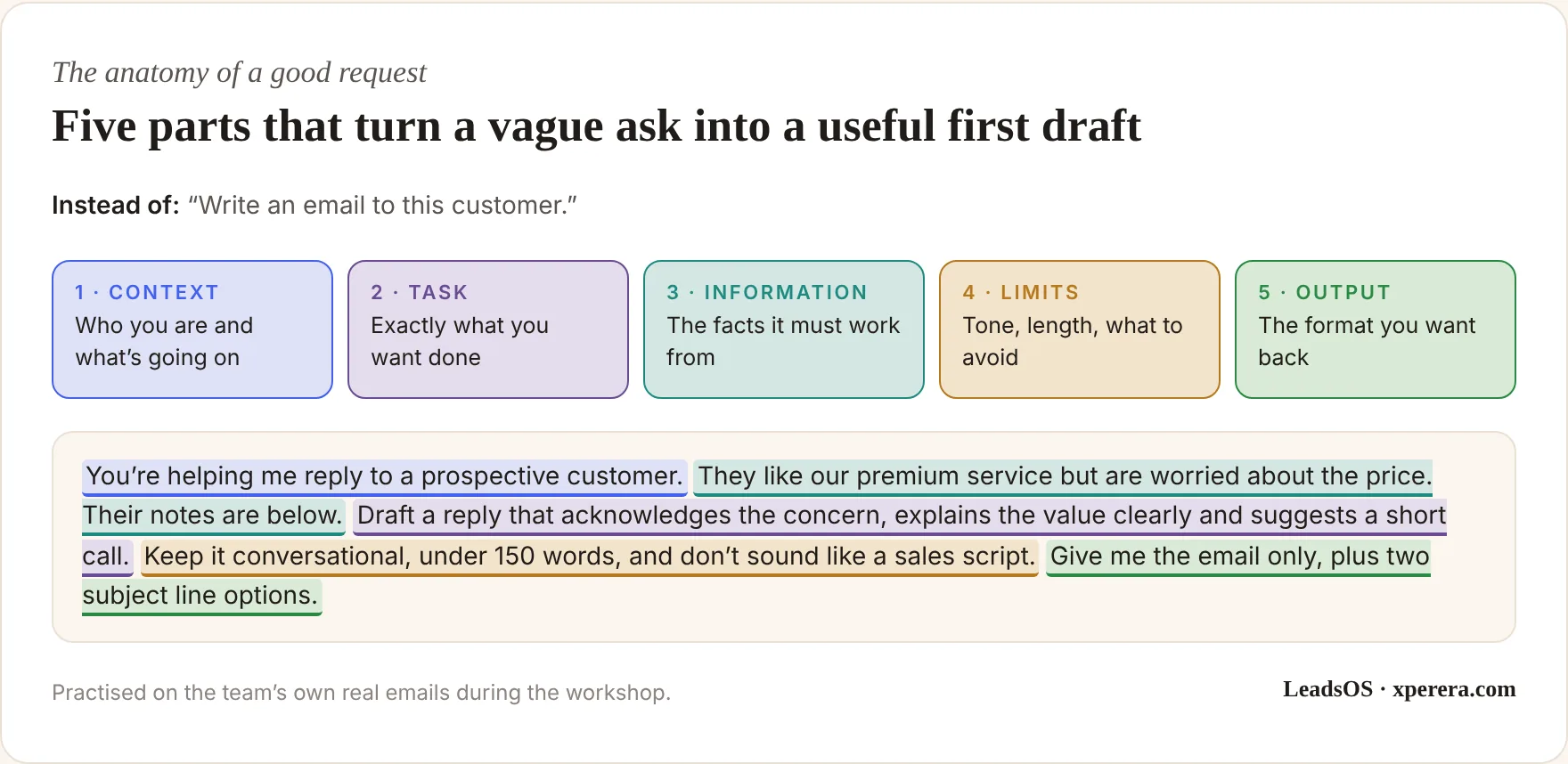
People see the difference immediately.
Then we practise on their own real emails, documents and scenarios. Not invented examples. Real work, with sensitive details removed.
Step 3: Build Each Person’s First AI Assistant
This is where training turns into implementation.
I don’t want people leaving with a notebook full of prompts. I want them leaving with something that works.
So in the session, each person builds their first reusable assistant: a ChatGPT Project, a custom GPT, a Claude Project or Skill, or whatever fits your company’s approved setup.
The tools will change. The principle won’t: turn something that worked once into something you can use every day.
Take a sales manager who keeps asking AI to review proposals. Instead of explaining the requirements every Monday, they build an assistant that already holds the company profile, product details, proposal structure, preferred tone, common objections and examples of past winning proposals.
Now every review starts from the same solid base. I explain more about role-based assistants in Cut the Busywork Out of Your Day.
What a Workshop Looks Like in Practice
Here’s how a session might run for a real estate team of ten consultants. Every exercise uses their own listings and client notes.
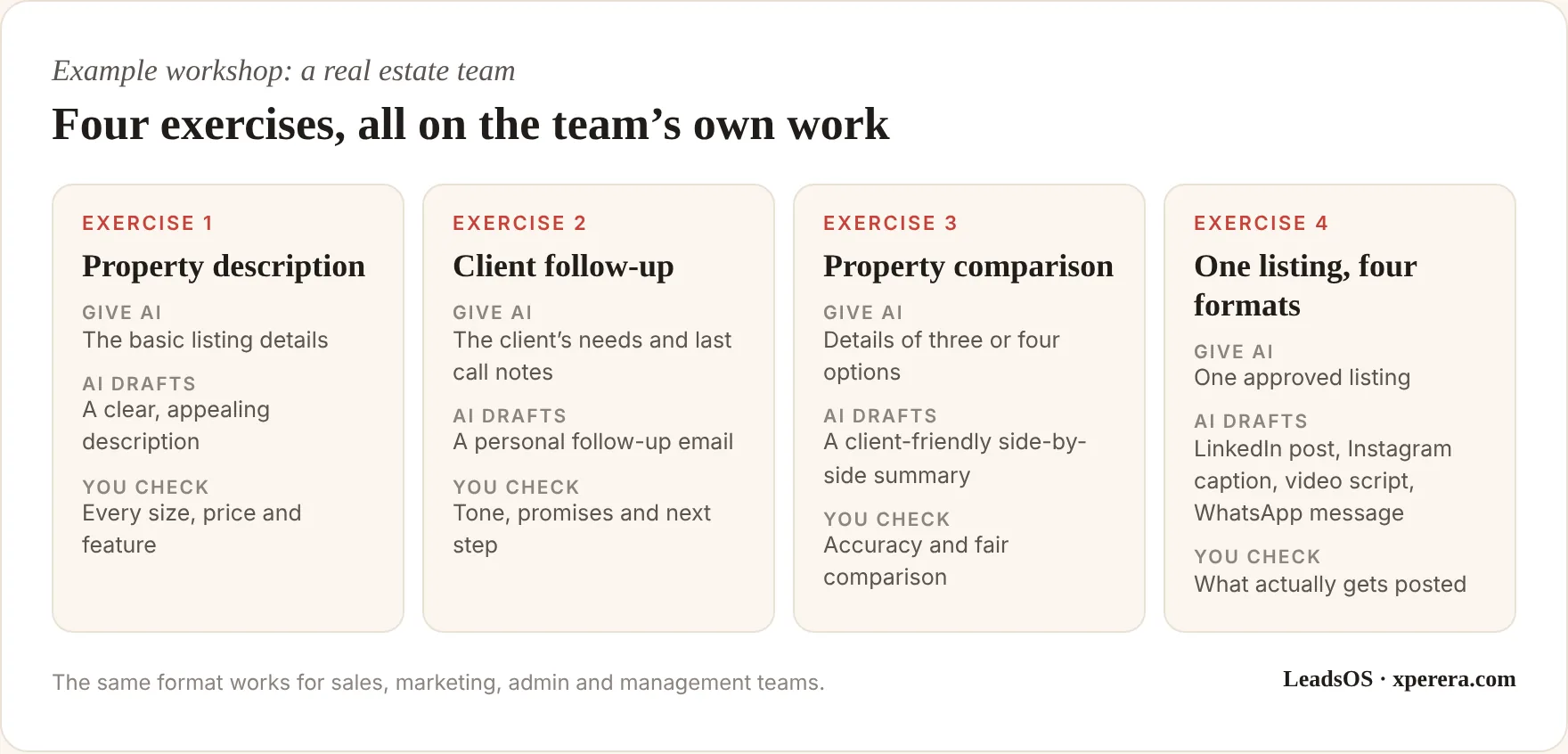
By the end, the agents see something important: AI isn’t just a writing tool. It can sit inside their daily work.
The same structure works for any team. A social media team builds an assistant for each client’s brand voice. An admin team turns meeting notes into decisions, actions and a follow-up email. A lead generation team turns raw research into a briefing before every sales call, which I cover in Never Miss a Lead Again.
A typical day runs in three blocks: a short morning on how AI works and how to ask well, a long middle section of hands-on exercises on real tasks, and an afternoon where everyone builds and tests their own assistant. People leave tired, but with something running.
Step 4: Teach What Not to Put Into AI
Training can’t only be about speed. It has to cover responsible use too.
People need simple, clear rules about what stays out of AI tools unless the company’s approved setup allows it: personal data, confidential client information, passwords and credentials, private contracts, staff records and sensitive business plans.
The exact rules depend on your systems, contracts and legal obligations, including the UAE’s data protection law if you hold personal data.
A clear one-page list beats a 30-page policy that nobody reads.
Step 5: Teach People to Check the Output
One of the most important AI skills is knowing that AI can be wrong.
An answer can sound completely confident and still contain a mistake. The rule I teach is simple:
That means checking facts, numbers, names, dates, sources, customer details, any legal or contract wording, and every claim about your products or services.
This isn’t a theoretical risk. In a well-known Harvard and Boston Consulting Group study, consultants using AI did significantly better on tasks the AI handled well, but were noticeably more likely to get the answer wrong on a task just beyond what the AI could do, because they trusted it.
Checking isn’t separate from productivity. It’s part of it.
Step 6: Agree a Simple Company AI Policy
Every company using AI needs basic rules. They don’t have to be complicated. A practical one-page policy answers six questions:
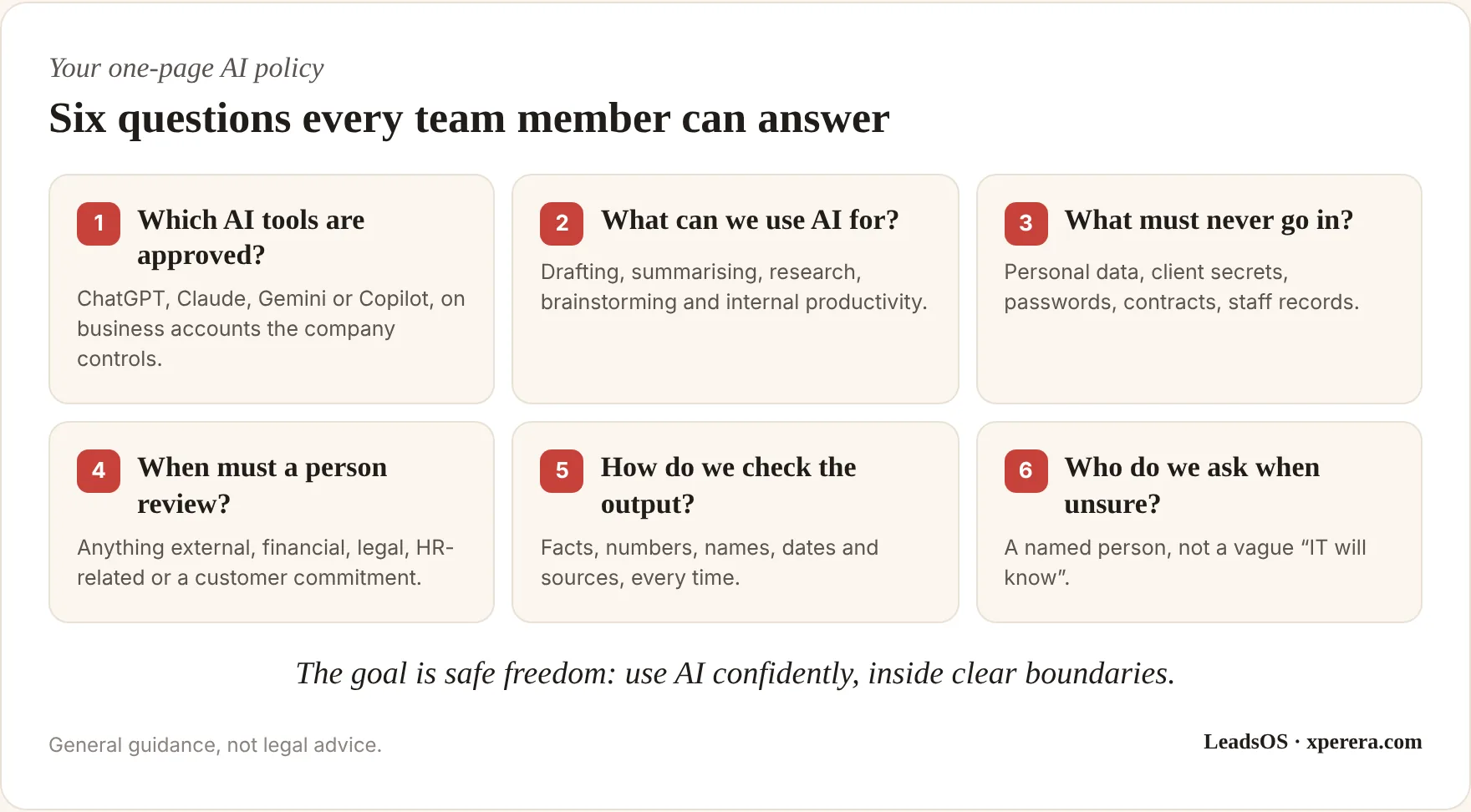
People should feel encouraged to use AI, not nervous about it. Clear limits are what make that possible.
Step 7: Follow Up After the Workshop
This is where most AI training fails.
The workshop goes well. Everyone is excited. People go back to their desks. Three weeks later, most of them are back to their old habits.
That’s completely predictable. Learning something isn’t the same as changing a habit.
So the work continues after the workshop, with short check-ins at about 30, 60 and 90 days:
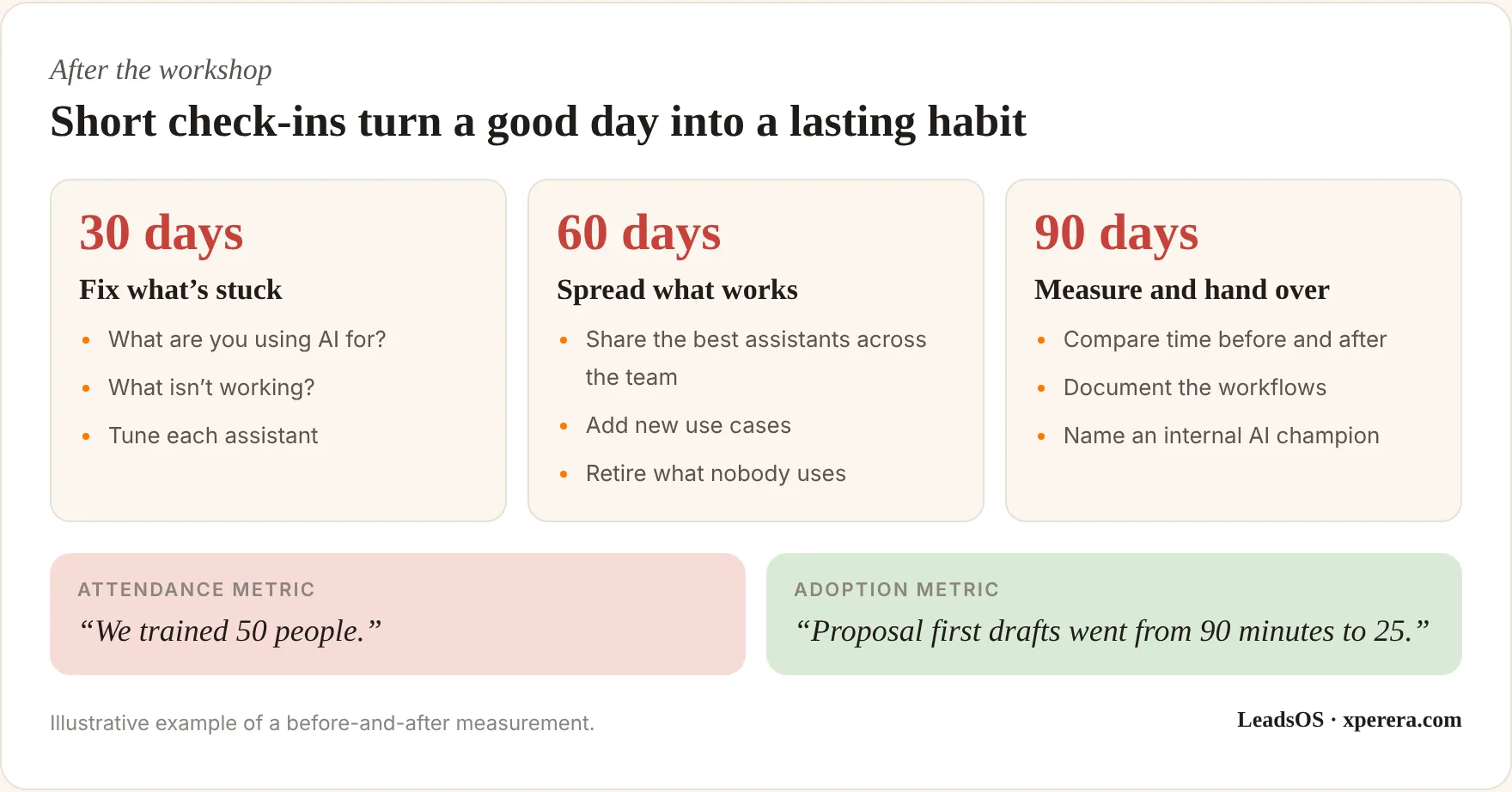
The check-ins aren’t more long training sessions. They’re course corrections: what’s working, what isn’t, which task is still done by hand, and what new use someone has discovered.
Step 8: Measure Adoption, Not Attendance
“We trained 50 employees” is an attendance number. It says nothing about what changed.
The real question is: what’s different now? Useful measures include how many people actively use the approved tools, how many reusable assistants are in daily use, time spent on selected tasks before and after, quality of the output and how confident people feel.
For example, if a proposal used to take 90 minutes and the first draft now takes 25, that’s real, measurable progress. The person still reviews and finishes it. But the starting point has changed.
What Each Team Typically Learns
Every role uses AI differently, so every group gets its own exercises. A few examples of what each team usually walks away with:
- Sales: prospect briefings before calls, first drafts of follow-ups and proposals, and objection handling based on your real offers.
- Marketing: one idea turned into posts for several platforms, campaign briefs, and content calendars in your brand voice.
- Administration: meeting notes turned into decisions and actions, standard letters, and tidy summaries of long email threads.
- Customer service: clear, consistent replies drafted from approved answers, with complex cases flagged for a person.
- Finance: plain-English summaries of reports, first drafts of explanations for management, and help with spreadsheet formulas, always checked against the numbers.
- Management: briefings from long documents, decision summaries, and better questions to ask the team.
Managers matter more than most people expect. When a manager uses AI openly and shares what works, the team follows. When managers stay away from it, adoption quietly stalls.
Common Mistakes I See
Most failed AI rollouts make one of the same few mistakes:
- One generic session for everyone. Finance and marketing sit through the same demo, and neither sees their own work in it.
- Tools before rules. People start pasting client data into personal accounts before anyone has said what’s allowed.
- No time to practise. A workshop on Monday, a full diary on Tuesday, and the new skill never gets used.
- No owner. Nobody inside the company is responsible for keeping assistants up to date or helping colleagues.
- Measuring the wrong thing. Counting attendance instead of tasks that actually changed.
Each one is easy to avoid once you know to look for it, and the programme below is designed around avoiding all five.
What the Research Tells Us
The evidence for practical, hands-on training is getting stronger.
The OECD’s surveys of employers and workers found that both training and involving workers in AI decisions are associated with better outcomes for workers.
The World Economic Forum reported on hands-on AI workshops where participants’ prompting ability rose by more than one point on a five-point scale in a single session. In one nonprofit group of 103 people, 95% said they expected to save at least 30 minutes a day afterwards. Those are workshop results, not a guarantee, but they show why practice beats a slide presentation.
And in a large field experiment across 66 firms and more than 7,000 knowledge workers, people who actually used their AI assistant spent about two fewer hours a week on email.
The same study found little change in other parts of the job. That’s the lesson: giving people AI doesn’t automatically change everything they do. The gains appear where AI fits naturally into existing work, which is exactly what role-based training targets.
The Exit: Make Your Team Independent
This is one of the most important parts of how I work.
AI consulting shouldn’t create permanent dependence on the consultant. The goal is a team that runs, and improves, its own AI work.
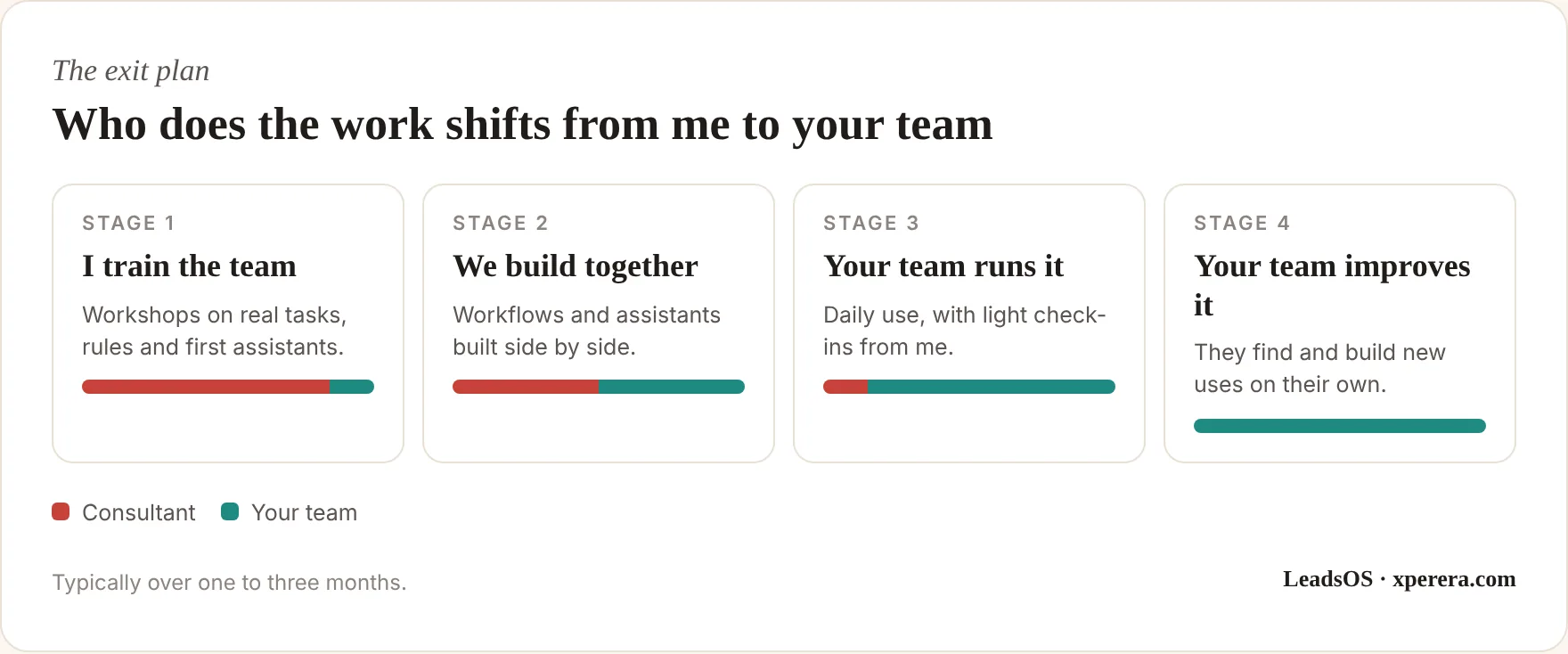
Your company shouldn’t need to call me every time someone wants a new prompt.
By the end, your team should have basic AI skills, approved tools, simple rules, reusable assistants, documented workflows, a way to judge new ideas and a clear route for getting help when needed.
That’s what sustainable AI adoption looks like.
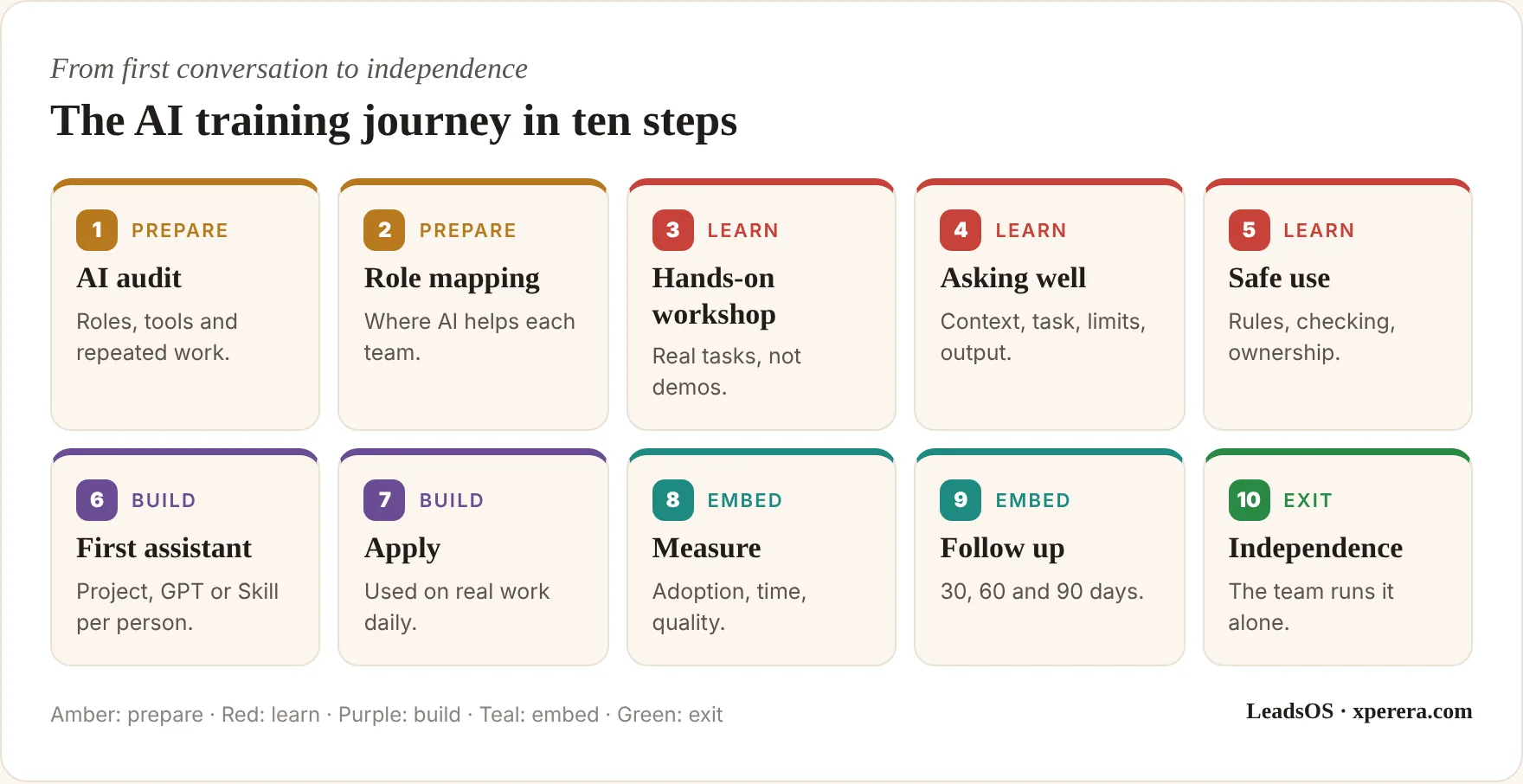
The Full Training Journey
Put together, a practical programme looks like this:
Training Should Change How People Think
The aim of an AI workshop isn’t to impress people with what ChatGPT, Claude or Gemini can do.
It’s to make them look at their own work differently.
Instead of “I have to write this report,” they start thinking, “Can AI create the first draft?”
Instead of “I need to read 50 emails,” they think, “Can AI summarise and sort these first?”
Instead of “I have to write up the meeting notes,” they think, “Can AI turn the transcript into decisions and actions?”
Instead of “I need to explain this to AI again,” they think, “Can I build a reusable assistant for this?”
That shift in thinking is the real result of good training.
The technology alone won’t transform your company. People changing the way they work will.
Give them the tools. Give them the skills. Give them real examples and safe boundaries. Give them time to practise. Then give them ownership.
What I Bring
A training programme shaped around your business, not a generic course:
- Role-based workshops: hands-on sessions for sales, admin, marketing and management, using your team’s real tasks
- A working assistant for each person: a Project, custom GPT or Skill built during the session and ready to use the next day
- Your one-page AI policy: approved tools, what stays out, when a person must review, and who to ask
- Follow-up and handover: check-ins at 30, 60 and 90 days, before-and-after measures, documented workflows and a named internal champion
Frequently Asked Questions
Does my team need any AI experience?
No. The training starts from people’s everyday work, so beginners and regular users both get value. Experienced users usually go further and build more advanced assistants.
Which AI tools do you train on?
Whatever fits your business: ChatGPT, Claude, Gemini or Microsoft Copilot. If you haven’t chosen yet, we decide together based on where your team already works.
Can the training be done in person?
Yes. Hands-on sessions work best in a room together, with people using their own laptops and their own real work.
How long does the whole programme take?
Typically one to three months from the first workshop to handover, including the follow-up check-ins. The workshops themselves fit around normal working weeks.
What happens after you leave?
Your team keeps the assistants, the policy and the documented workflows, plus an internal champion who knows how to build new ones. That’s the point of the exit plan.
Ready to get your whole team using AI properly?
Book a 20-minute call and we’ll look at where training would make the biggest difference. No pitch, no pressure.
Bick, Blandin & Deming, The Rapid Adoption of Generative AI, NBER Working Paper 32966.
OECD, Generative AI and the SME Workforce (2025).
OECD, The Impact of AI on the Workplace: OECD AI Surveys of Employers and Workers.
World Economic Forum, AI skills at scale (2026).
Dillon, Jaffe, Immorlica & Stanton, Shifting Work Patterns with Generative AI, NBER Working Paper 33795.
Dell’Acqua et al., Navigating the Jagged Technological Frontier, Harvard Business School Working Paper 24-013 (2023).